
The IMEI is the most important number on a phone you are about to buy, and it is the one most buyers glance at without understanding what it does.
It is not just an identifier. Canadian carriers share a list of phones reported lost or stolen, and a phone on that list is blocked on their networks. The IMEI is how they know which phone it is.
That means a phone bought cheaply today, with a clean screen and a healthy battery, can become unusable if its IMEI was reported stolen. No repair fixes that. This guide explains how to read these numbers, how to verify them, and what they can and cannot tell you.
The four numbers, and what each one does
| Identifier | What it identifies | What it is used for |
|---|---|---|
| IMEI | The handset on mobile networks | Carrier allow and block lists, theft reports |
| IMEI2 | A second line on dual SIM models | The same, for the second line |
| Serial number | The unit to Apple | Warranty, coverage, service history |
| EID | The embedded SIM chip | eSIM provisioning, on eSIM capable models |
A genuine iPhone has all of the ones that apply to it, and they should agree with each other and with the box.
Where to find them
Check the device itself. Never accept a number the seller reads out or sends you in a message, because a number can belong to a completely different phone.
1. Dial the check code
Open the phone app and dial *#06#. The IMEI appears immediately, without needing to unlock anything else. On dual SIM models it shows IMEI and IMEI2, and usually the EID as well.
This is the fastest method and the one to use first.
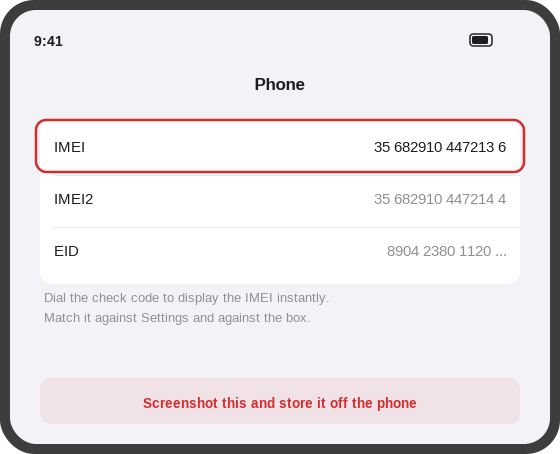
2. Settings, General, About
Scroll and you will find the serial number, IMEI, and on eSIM capable models the EID. This screen also shows the model number and storage capacity, so it is worth reading properly rather than glancing at.
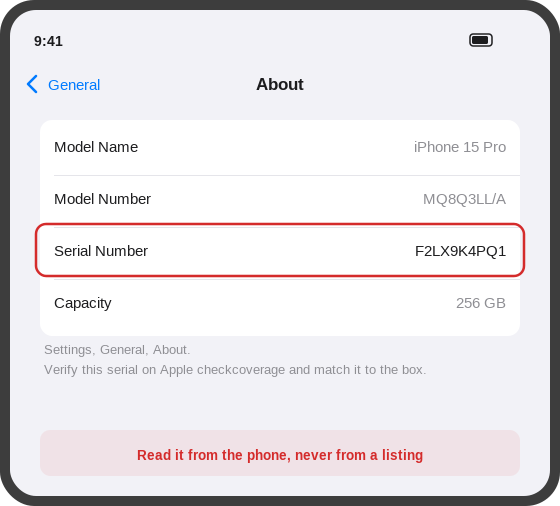
3. The SIM tray
On models with a physical SIM tray, the IMEI is engraved on the tray itself on many models. Recent eSIM only iPhones have no tray, so this method has quietly disappeared on the newest models.
4. The original box
Printed on the label, along with the model and part number. This is the one to match against the phone. A mismatch between box and device does not always mean theft, but it does mean the phone has been separated from its packaging, and you should ask why.
5. Connected to a computer
Connect the iPhone and open Finder on a Mac, or the Apple Devices app on Windows, and the device information panel shows the serial and IMEI.
6. Your Apple account
Signed in at the Apple ID account page, every device linked to your account is listed with its serial. This is useful for your own phones, and for confirming a device has been properly removed from a previous owner account.
Verifying with Apple
Take the serial number and enter it on Apple's coverage checker at checkcoverage.apple.com.
A genuine device returns the correct model and a coverage or support status. If Apple does not recognise the serial at all, the device is not genuine and there is nothing further to discuss.
What this proves: the serial is real and registered to that model. What it does not prove: that the phone in your hand is that phone, or that its internals have not been replaced. Verify on the device, not from a photo.
The blacklist question
Canadian carriers have shared a blacklist of phones reported lost or stolen since 2013. When an owner reports a phone, its IMEI goes on the list, and the phone is blocked on participating Canadian networks, not only the one it was bought from.
Anyone can check an IMEI against that list at Device Check Canada (devicecheck.ca), which is run by the Canadian Telecommunications Association. The RCMP advises running that check before buying a used phone.
The list is the mechanism intended to make stolen handsets worthless, which is good for owners and bad for anyone who unknowingly buys one.
What this means when you buy
- A blocked device cannot be unblocked by the seller, a repair shop, or software.
- The block follows the handset, not the SIM, so changing networks does nothing.
- If a phone is unusually cheap and the seller is vague about its history, the IMEI is the thing to check hardest.
- Run the IMEI through Device Check Canada before you pay, reading the number from the phone itself. It takes under a minute.
That last step is the single most practical protection available to anyone buying a used phone privately.
What an IMEI check cannot tell you
Be clear about the limits, because overconfidence here is how people get caught.
- It cannot confirm a phone is not stolen if the theft has not been reported. Many are not reported promptly, so a clean check today does not guarantee a clean check next month.
- It says nothing about condition, battery health, or whether the screen and battery are genuine Apple parts.
- It does not detect Activation Lock, which is a separate check.
- A valid IMEI can be cloned onto a counterfeit device, so a clean result does not prove the phone itself is genuine.
Use it alongside the other checks rather than in place of them. Our guides on how to know if an iPhone is original and what to check before buying a used iPhone cover the rest.
Record your own IMEI today
This takes thirty seconds and is worth doing now, on the phone you are reading this on.
- Dial *#06#.
- Screenshot the result.
- Save it somewhere not on the phone: email it to yourself, or store it in a password manager or a note in cloud storage.
If your phone is stolen, you will need the IMEI to report it. Reporting is what gets it blacklisted, and blacklisting is what makes it worthless to whoever took it. Without the number, that process is far harder.
Also worth doing: cover the IMEI in any photographs if you later sell the phone online. Publishing it openly invites cloning.
Buying without the risk
Every check here is one you should be able to run before you commit, whoever you buy from. A seller who objects to a two minute IMEI and serial check is telling you something about the phone or about themselves.
We test every unit before it ships, and deliver across Canada, next day in the GTA. Run every check on this page when it arrives: if something is not right, our 15 day return policy applies as long as it comes back in the condition it reached you.
Browse iPhones, or read what to check before buying a used iPhone for the full list.
Every unit is tested before it ships and backed by our 15 day return policy. Order online for delivery across Canada, next day in the GTA. Upgrading? Swap your old device towards it.