
Most people asking whether an iPhone is original are picturing one thing: a convincing counterfeit running fake software. Those exist, and they are the easiest problem on this list to catch. You can rule one out in about thirty seconds.
The harder and far more common problems are the other two: a pre-owned or refurbished phone sold at brand new prices, and a genuine iPhone whose screen, battery or camera has been replaced with non genuine parts. Both of those pass a casual glance. Both are what these checks are really for.
Here is the full process. It takes about five minutes with the phone in your hand.
The 60 second version
If you only do four things, do these:
- Settings, General, About. Read the serial number and model number.
- Verify the serial on Apple's coverage checker at checkcoverage.apple.com and confirm it matches the box.
- Scroll to Parts and Service History in that same screen. Any non genuine part is listed there.
- Confirm Find My is off and no Apple account is signed in.
If all four pass, the phone is almost certainly genuine and unlocked. The rest of this guide tells you what those checks miss.
What "fake" actually means
Three different problems get called the same thing, and they need different checks.
| Problem | What it is | How it is caught |
|---|---|---|
| Clone | Android device skinned to look like iOS | App Store, Siri, coverage check |
| Misrepresented condition | Pre-owned or refurbished sold as new | Model number, battery health, parts history |
| Parts swapped | Genuine iPhone with non genuine internals | Parts and Service History, Face ID, display test |
Most buying guides only cover the first. In practice, the second is what actually costs buyers money.
The ten checks
1. Read the serial number and model number
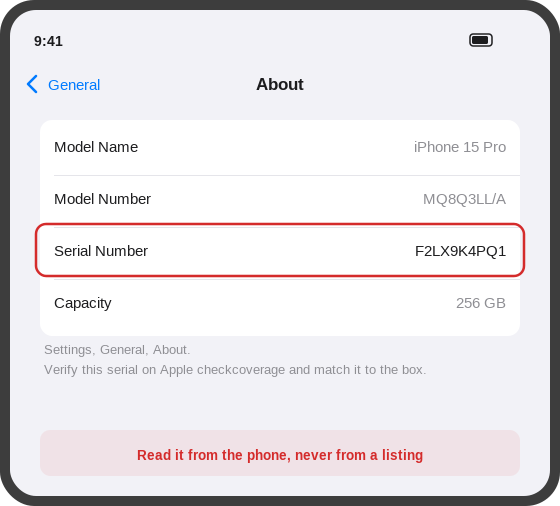
Go to Settings, General, About. Note the serial number, the model number and the IMEI.
A clone often cannot produce a coherent About screen at all. If the fields are missing, oddly formatted, or the storage capacity does not match what you were sold, stop there.
2. Verify the serial with Apple
Enter the serial on Apple's coverage checker at checkcoverage.apple.com.
It should return the correct model and a warranty or support status. If Apple does not recognise the serial, the device is not genuine.
What this proves: the serial exists and is registered to that model. What it does not prove: that the phone in front of you is that phone. Serial numbers can be copied onto a listing. Always check on the device itself, not from a number the seller sends you.
3. Match the IMEI in two places
Dial *#06# on the phone. The IMEI appears on screen.
Compare it with the IMEI in Settings, General, About, and with the one printed on the original box. All three should match exactly.
A mismatch between the screen and the box usually means the phone has been swapped into another box, which at minimum means you are not being told the whole story.
4. Read the model number prefix
In that same About screen, look at the first letter of the model number.
| Prefix | Widely understood to mean |
|---|---|
| M | New retail unit |
| F | Apple refurbished |
| N | Replacement issued through Apple service |
| P | Personalised or engraved |
This convention is well established among buyers and repairers, though it is not something Apple publishes as a formal specification, so treat it as a strong signal rather than proof.
It is the fastest way to catch a refurbished unit being sold as brand new. If the box says new and the model number starts with F or N, ask why.
5. Check Parts and Service History
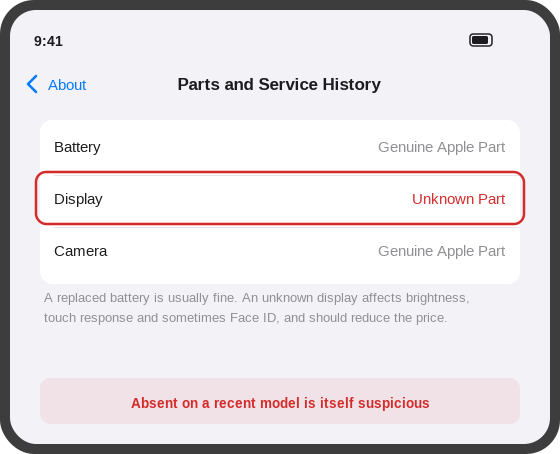
Still in Settings, General, About, scroll down. iOS lists parts that are not genuine Apple components, or that were fitted outside Apple's service system.
A replaced battery is not a problem in itself, especially on an older phone, and it should be reflected in the price. A non genuine display is more serious, because it affects brightness, colour, touch response and sometimes Face ID.
If this section is absent on a recent model, be suspicious.
6. Confirm Activation Lock is off
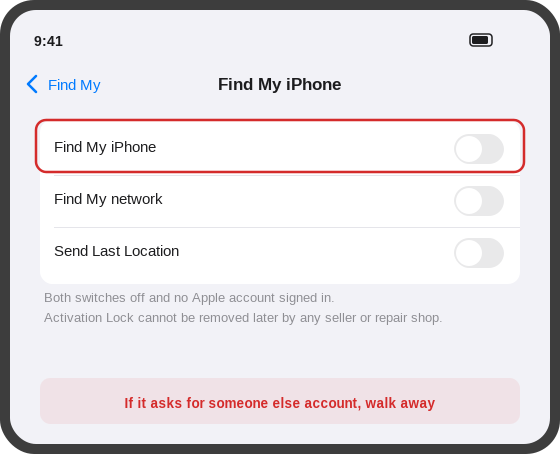
Find My must be off, with no Apple account signed in.
This is the most expensive mistake a buyer can make, and the easiest to avoid. An activation locked iPhone cannot be set up, cannot be used, and cannot be unlocked by the seller, by a repair shop, or by any software sold online. No amount of goodwill after the sale fixes it.
Ask the seller to fully erase the device in front of you and let it boot to the setup screen. If it asks for a previous owner's Apple account, walk away.
7. Check battery health
Settings, Battery, Battery Health.
Above 85 percent is healthy on a pre-owned unit. Below 80 percent means a replacement is due and the price should reflect it.
This also serves a second purpose. Clones cannot reproduce this screen properly, so a correct, detailed battery health readout is further evidence you are looking at real iOS.
8. Test Face ID and the cameras
Register a face on the spot. Face ID hardware cannot be transplanted between devices, so if it fails or is missing, the phone has been through a repair that matters.
Open the camera and shoot on every lens, front and back, and test zoom. A lens that does not switch, or produces obviously poor results, points at replaced camera modules.
9. Open the App Store and ask Siri
This is the clone test.
Search for and download a free app. Then hold the side button and ask Siri a question.
Clones run a skinned Android build. They cannot reproduce the App Store or Siri convincingly. If both behave normally, the device is running genuine iOS.
10. Inspect the hardware
Last, use your hands.
- Weight and balance. Genuine iPhones feel dense. Clones usually feel light.
- Button feel. Crisp and firm, not soft or rattling.
- Screen edges. Look for gaps, uneven glue lines or lifting, which indicate the phone has been opened.
- The display at full brightness on white, which reveals colour casts and staining typical of non genuine screens.
- Ports and speaker grilles. Machining should be clean and symmetrical.
- Screws beside the charging port. Missing, damaged or mismatched screws mean the phone has been opened.
Red flags in the sale itself
Sometimes the phone is fine and the situation is not.
- The seller will not let you run these checks before payment.
- The price is far below the market. On a current model, a large discount is a question, not a bargain.
- No box, no receipt, and no explanation.
- Pressure to pay quickly or to meet somewhere unusual.
- The seller cannot say which market the unit came from. This also determines whether it has a SIM tray, which matters on recent models.
- Vague answers about battery health, or reluctance to open Settings.
No single check on this page is proof on its own. A genuine serial can belong to a different phone. A clean parts history can hide a fault. What gives you confidence is several checks agreeing, plus a seller you can go back to.
If you have already bought one
Act quickly.
- Contact the seller in writing and state the problem clearly.
- Return it within any stated window. Keep the receipt, box and packaging.
- If you paid by bank transfer, raise it with your bank promptly, because timelines matter.
- Do not attempt to have a clone "fixed". It is not a repairable iPhone.
Buying without the worry
Every check on this page is one you should be able to run on a used phone, without being rushed, before any money changes hands. A seller who treats that as an insult has told you what you need to know.
Redwhale tests every unit before it ships, discloses battery health and the source market rather than leaving you to discover them, and backs every purchase with a 15 day return policy, which is long enough for a hidden fault to appear under normal use. We deliver across Canada, next day in the GTA.
You can repeat every one of these checks in the first days after it arrives.
Browse iPhones, or read what to check when buying a used iPhone if you are weighing a pre-owned unit, and the best iPhones in Canada guide if you are still choosing a model.
Every unit is tested before it ships and backed by our 15 day return policy. Order online for delivery across Canada, next day in the GTA. Upgrading? Swap your old device towards it.