
Most advice about buying a used iPhone stops at whether it is genuine. That is the easy part, and it is covered separately in how to know if an iPhone is original.
The harder question is the one you face standing in front of a phone that is definitely real: is this particular unit in good condition, and is it worth the asking price? Two genuine iPhones of the same model can differ by a large amount in value depending on things you can see in five minutes.
This is the inspection, in the order worth doing it.
Do these three first
Some faults end the conversation. Check them before you assess anything else, because if any fails, condition does not matter.
1. Activation Lock
Settings, General, About, and ask the seller to erase the device and let it boot to the setup screen.
If it asks for a previous owner Apple account, stop. An activation locked iPhone cannot be set up, cannot be used, and cannot be unlocked by any seller, repair shop or software tool sold online. Only the original account holder can remove it.
This is the most expensive mistake in the used market, and it takes ten seconds to avoid. Never pay on a promise to resolve it afterwards.
2. Carrier lock
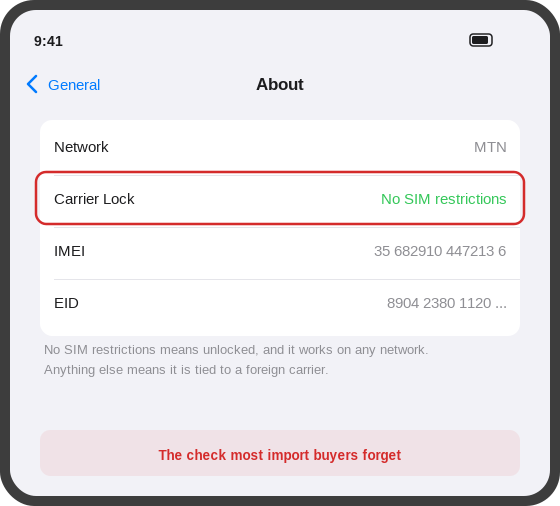
Settings, General, About, then find Carrier Lock.
You want it to read No SIM restrictions. That means the phone is unlocked and will work on any network.
Anything else means the unit is tied to a specific carrier. Canadian carriers have had to sell phones unlocked, and unlock older ones free on request, since December 2017, so a locked Canadian unit is easy to sort out. A locked US unit is the real risk: unlocking depends entirely on that carrier’s policy.
If the phone runs a very old version of iOS, this menu may not appear. In that case test it with your own SIM before paying.
3. Non genuine parts
Settings, General, About, scroll to Parts and Service History.
iOS lists components that are not genuine Apple parts or were fitted outside Apple service. A genuine replaced battery is fine and often good news on an older phone. A non genuine display is the one to take seriously, because it affects brightness, colour, touch response and sometimes Face ID.
This does not automatically end the deal, but it should change the price.
Then assess condition
Once the deal breakers pass, everything else is a question of value rather than viability.
Battery health
Settings, Battery, Battery Health.
| Reading | What it means | Effect on price |
|---|---|---|
| Above 90 percent | Lightly used | Full price is fair |
| 85 to 90 percent | Healthy for its age | Full price is fair |
| 80 to 85 percent | Acceptable | Modest reduction |
| Below 80 percent | Replacement due | Deduct the replacement cost |
This is the single most useful number in a used phone sale. A battery replacement is not ruinous and is far cheaper than moving up a generation, but it should be priced in before you pay, not discovered afterwards.
Liquid damage
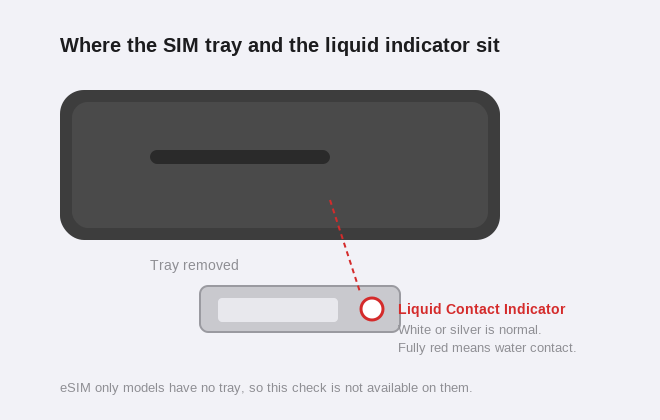
Every iPhone built since 2006 has a Liquid Contact Indicator. It is normally white or silver, and turns fully red after contact with water or a liquid containing water. Normal humidity and temperature will not trigger it.
On models with a SIM tray, the indicator sits inside the tray slot, so you can see it by removing the tray. On recent eSIM only models there is no tray to open, so you lose this check entirely, which is one more reason to be careful with the newest imports.
Apple does not cover liquid damage under warranty. A red indicator does not mean the phone will fail tomorrow, but it means corrosion is possible and future faults are more likely. Price accordingly, or walk.
The screen
Set brightness to maximum and display a plain white image, then a plain black one.
- White reveals dead pixels, discolouration and staining.
- Black reveals backlight bleed and uneven lighting around the edges.
- Look along the edges for gaps, lifting or uneven adhesive, which mean the phone has been opened.
Run a finger across the whole screen in a drawing app to check for dead touch zones.
Face ID and cameras
Register a face on the spot. Face ID hardware cannot be transplanted between devices, so a failure here is permanent and expensive.
Open the camera and shoot on every lens, front and back, including the telephoto on Pro models. Check that lenses switch cleanly and that no image is soft or hazy, which suggests a cracked or replaced module.
Buttons, ports and sound
- Press every button, including volume, side and any Action or Camera Control button.
- Plug in a charger and confirm it charges. Try wireless charging if available.
- Play audio through the speaker, then make a real call to test the earpiece and microphone together.
- Check the SIM tray seats properly, if the model has one.
Grading a unit before you pay
A simple way to think about what you are looking at.
| Grade | What you are seeing | What to pay |
|---|---|---|
| A | Battery above 90 percent, no parts flagged, clean screen, no marks | Full market price |
| B | Battery 85 to 90 percent, light cosmetic wear, genuine parts | Slightly below market |
| C | Battery 80 to 85 percent, visible wear, or a genuine replaced part | Clearly below market |
| Avoid | Activation or carrier locked, red liquid indicator, non genuine display, battery below 80 at full price | Walk away |
Most honestly described used iPhones sit at B. That is normal and fine. What you are guarding against is paying grade A money for a grade C phone.
Using the checklist to negotiate
Every fault you find is either a reason to walk or a reason to pay less. Be specific rather than vague.
- Battery below 85 percent. Ask for the cost of a replacement off the price.
- Non genuine screen. This affects daily use, so it justifies a real reduction, not a token one.
- Cosmetic marks. Worth something, but less than people think. They do not affect function.
- Missing box or accessories. Minor, unless you were told it was complete.
- Red liquid indicator. This is a walk away for most buyers. If you proceed, it should be at a substantial discount.
A seller who has tested the phone properly will already know these numbers and will not be surprised when you raise them.
Red flags in the sale itself
- Refusing to let you run these checks, or rushing you.
- A price far below market on a current model.
- No box, no receipt and no explanation of where the phone came from.
- Vague answers about battery health or which market the unit came from.
- Pressure to pay before inspecting, or to meet somewhere unusual.
- A seller with no physical address to return to.
The most important protection is not any single check. It is buying somewhere you can go back to. Faults that matter often surface after a few days of normal use, not in the first five minutes.
After you buy
- Set up the phone fully before you leave, if you can.
- Insert your SIM or activate your eSIM and confirm calls and data work.
- Sign in to your own Apple account and confirm nothing else is signed in.
- Use it hard for the first few days, while any return window is still open.
Where to buy used
Redwhale runs every check on this page before a pre-owned unit ships. Battery health is disclosed rather than left for you to find, we tell you which market the unit came from, and every purchase carries a 15 day return policy, which is long enough for a hidden fault to appear in normal use. We deliver across Canada, next day in the GTA.
You can repeat every check in the first days after it arrives.
See used iPhones in stock, or read the best used iPhones in Canada guide to pick a model.
Every unit is tested before it ships and backed by our 15 day return policy. Order online for delivery across Canada, next day in the GTA. Upgrading? Swap your old device towards it.