
Battery health is the number everyone checks on a used iPhone, and it is also the number most easily faked. Both of those things are true at once, which is why reading the percentage is only the beginning.
The useful skill is not finding the number. It is knowing whether the number is plausible for a phone of that age, and what to do when it is not.
Where to find it
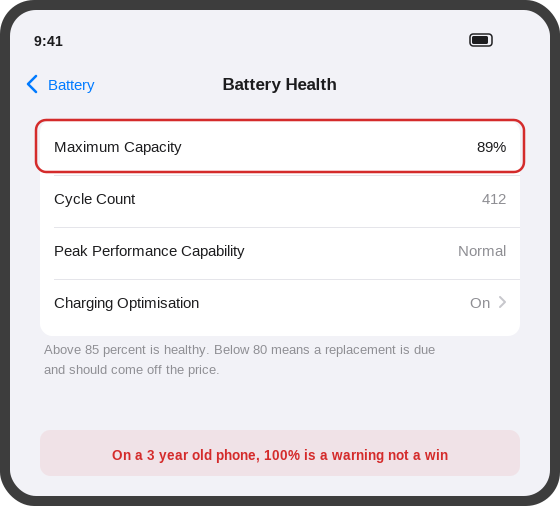
Settings, Battery, Battery Health and Charging.
Two things appear there:
- Maximum Capacity. The current capacity as a percentage of the battery when it was new. A phone at 88 percent holds 88 percent of the runtime it had on day one.
- Peak Performance Capability. A message about whether the battery can still deliver power on demand. If it says performance management has been applied after an unexpected shutdown, the battery is degraded enough to be throttling the phone.
On iPhone 15 and later, the same screen also shows the cycle count, which is the single most honest number available about how hard a phone has been used.
What the number should be
A percentage means nothing without the age of the phone beside it. Apple designs its batteries to specific targets:
| Model | Designed to retain 80 percent capacity at |
|---|---|
| iPhone 14 and earlier | 500 complete charge cycles |
| iPhone 15 and later | 1000 complete charge cycles |
A complete cycle is a full charge worth of use, which for most people accumulates over more than one day. Roughly speaking, a phone in normal daily use loses somewhere near one percent a month, though heat and charging habits move that a great deal.
So, rough expectations for a used phone:
| Age | Plausible reading |
|---|---|
| Under 1 year | 92 to 100 percent |
| 1 to 2 years | 85 to 95 percent |
| 2 to 3 years | 80 to 90 percent |
| Over 3 years | Often below 85 percent |
Use this as a sense check, not a rule. A lightly used three year old phone can genuinely read in the high eighties.
What to accept when buying
- Above 85 percent. Healthy. Pay full market price.
- 80 to 85 percent. Acceptable, at a modest reduction.
- Below 80 percent. A replacement is due. Deduct the cost of it.
A battery replacement is not a disaster. It costs a fraction of moving up a generation and it restores full runtime. What matters is that it is priced in before you pay rather than discovered a fortnight later.
Why 100 percent can be a warning sign
This is the part most buying advice misses, and it inverts what people assume.
Battery health readings can be manipulated, and doing so is an established practice in parts of the used phone trade. There are three known methods:
- Moving the management chip. The controller chip from an original battery is transferred onto a generic cell, so the phone reads it as the original battery in original condition.
- Adding a small component that reports false health figures and suppresses the warning messages iOS would otherwise show.
- Software resets performed during refurbishment, which reset the stored battery data. Third party battery apps read the same underlying data, so they are fooled too.
The motive is straightforward economics. Buyers and trade in schemes often require 85 percent or better, and adding a cheap component costs far less than fitting a real battery.
The practical consequence for you: a used phone that is two or three years old and reports 100 percent should raise your eyebrows, not lower your guard. It is only plausible if the battery was genuinely replaced recently, and that is something a seller should be able to evidence.
How to sense check a reading
- Compare the figure with the age of the phone, using the table above.
- Check Parts and Service History in Settings, General, About. A non genuine or unknown battery is flagged there. Note that a spoofing component may suppress this, so its absence is not proof.
- Check the cycle count if it is an iPhone 15 or later. A low cycle count on an old phone is another implausibility worth asking about.
- Ask for evidence of any replacement. A receipt from a reputable repairer, or Apple service records tied to the serial.
- Run the phone. Play video at high brightness for ten minutes and watch the percentage. A genuinely healthy battery drops a few points. A tired one falls off a cliff.
That last test is the one that cannot be spoofed by a chip, because it measures behaviour rather than a stored value.
What actually kills iPhone batteries
Worth knowing both for buying and for keeping your own phone alive longer.
Heat is the biggest factor. Sustained high temperature degrades lithium ion cells faster than charge cycles do. The common culprits:
- Leaving a phone on a car dashboard or seat in direct sun.
- Charging under a pillow or in a closed bag.
- Gaming or navigating while charging in an already hot room.
- Using a phone in a case while fast charging on a hot day.
Charging habits matter less than people think, with two exceptions: routinely running to zero, and leaving the phone at 100 percent in heat for long periods.
Optimized Battery Charging, on by default, learns your routine and delays charging past 80 percent until you need it. On recent models you can also set a hard charge limit. Both are worth leaving on.
What this means for buying a used iPhone
Battery health should change the price, not end the conversation. A phone at 82 percent with everything else in good order, priced with a replacement in mind, is often better value than a phone at 91 percent priced as if it were new.
What should end the conversation is a reading that does not add up and a seller who cannot explain it.
Our what to check before buying a used iPhone guide covers the rest of the inspection, and how to know if an iPhone is original covers authenticity.
How we handle it
Redwhale discloses battery health on pre-owned units rather than leaving you to discover it, and every unit is tested before it ships. If a battery has been replaced, we say so. Purchases carry a 15 day return policy, which is long enough for a battery that misbehaves under real use to reveal itself, which is exactly the failure a spoofed reading is designed to hide.
Run the ten minute video test as soon as it arrives.
Browse used iPhones, or read the best used iPhones in Canada guide to pick a model.
Every unit is tested before it ships and backed by our 15 day return policy. Order online for delivery across Canada, next day in the GTA. Upgrading? Swap your old device towards it.