
Checking a Samsung is a different job from checking an iPhone, and the reason is Android itself.
An iPhone counterfeit has to imitate iOS, which it cannot do convincingly for long. A Samsung counterfeit runs a modified version of Android with Samsung styling applied on top, and that gets much closer to the real thing. The home screen looks right. The settings look right. The icons look right.
What a clone cannot do is reproduce the parts of the phone that are tied to Samsung hardware or licensed from Google. That is where these checks aim.
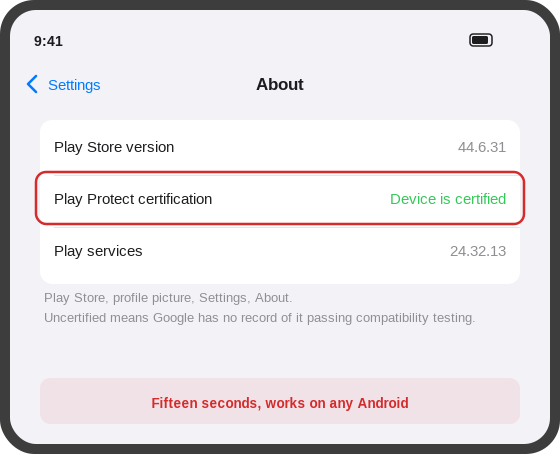
The fastest test: Play Protect certification
Start here. It takes fifteen seconds and catches most counterfeits.
- Open the Play Store.
- Tap your profile picture, top right.
- Tap Settings, then expand About.
- Read Play Protect certification.
You want it to say the device is certified.
If it does not, Google has no record of that device passing Android compatibility testing. On a phone sold as a genuine Galaxy, that is a serious warning. Google also notes that uncertified devices may not receive system or app updates, and that Google apps on them are not licensed.
This check is useful on any Android phone, not just Samsung.
Samsung dial codes
These open diagnostic screens built into genuine Samsung firmware. Type them into the phone dialler. A clone will usually do nothing at all, or show a crude imitation.
| Code | What it should show |
|---|---|
*#0*# | Full hardware test menu: display, touch, sensors, speaker, microphone, cameras |
*#1234# | AP, CP and CSC firmware versions, plus the model |
*#06# | IMEI, and IMEI2 on dual SIM models |
*#12580*369# | RF calibration date, a good proxy for manufacturing date |
The hardware test menu
*#0*# is the strongest of these. On a genuine Samsung it opens a proper
diagnostic menu that lets you test the screen for dead pixels, check every
sensor, test the speaker and microphone, and run each camera.
Run it. It doubles as a condition check on a used phone, which no other single screen gives you.
The manufacturing date
*#12580*369# shows the RF calibration date, which is when the radio was
calibrated at the factory. It is a good approximation of when the phone was
built.
This is genuinely useful for checking a claim. A phone sold as the latest model, brand new, with a calibration date two years old, needs explaining.
A caution on all of these: some codes have been disabled on newer One UI builds, so a code that does nothing is not automatic proof of a fake on a very recent handset. Use them alongside the other checks rather than alone.
Knox and Secure Folder
Knox is Samsung's security platform, and it is built into genuine Galaxy hardware rather than added by software.
- Settings, Biometrics and security, and look for Secure Folder. Genuine devices offer it.
- Settings, About phone, Software information shows a Knox version on genuine devices.
Because Knox is tied to the hardware, a clone running a Samsung styled Android build generally cannot reproduce it convincingly.
The model number
Settings, About phone.
Samsung model numbers follow the format SM- followed by letters and digits, for example SM-S938 for a recent flagship. Confirm that:
- the model number is present and follows that format,
- it matches the model you were told you are buying, and
- it matches the label on the box.
Also check the build number and Android version look like a real Samsung build rather than a generic string.
IMEI, and the Canadian blacklist
Dial *#06#, and compare the IMEI against Settings, About phone and against
the box. All three should match.
Canadian carriers share a blacklist of phones reported lost or stolen, and a phone on it is blocked on participating Canadian networks, not only the one it was bought from.
A blocked handset cannot be restored to service by any seller. The practical protection is simple: check the IMEI at Device Check Canada (devicecheck.ca) before you pay. It is run by the Canadian Telecommunications Association and takes under a minute.
Our IMEI guide explains the blacklist in more detail. The principle applies to any handset, not only iPhones.
Samsung Members
Genuine Galaxy phones ship with the Samsung Members app, which includes device diagnostics and warranty information tied to the specific handset.
Open it and run the diagnostics. A clone will either not have the app, or the app will fail to recognise the device properly.
Physical and behavioural checks
Secondary, but worth a minute:
- Screen quality. Genuine Samsung flagships use high quality AMOLED panels. Counterfeits often use LCD, which is visible as weaker blacks and worse viewing angles.
- Refresh rate. A current Galaxy flagship should scroll at 120Hz. A clone usually will not.
- Camera behaviour. Open the camera and switch between lenses. Fakes often have fewer real lenses than the housing suggests, so the framing does not change as it should.
- Weight and build. Genuine flagships feel dense with even seams.
- Charging speed. Counterfeits rarely support genuine fast charging.
What to check before you pay
- Play Protect certification says the device is certified.
*#0*#opens the hardware test menu, and you run it.*#1234#shows proper firmware strings.- IMEI matches across dialler, settings and box.
- A SIM goes in and a call connects.
- Knox version and Secure Folder are present.
- No Google account is signed in, so the device is not locked to a previous owner.
Point seven matters as much on Android as Activation Lock does on iPhone. A device still tied to someone else's Google account cannot be cleared by the seller afterwards.
Current Samsung stock
Where to buy in Canada
We sell Samsung Galaxy phones online, with delivery across Canada, next day in the GTA. Every unit is tested before it ships, and purchases carry a 15 day return policy as long as the phone comes back in the condition it reached you.
Run every check on this page when it arrives.
Browse Samsung phones to see what is in stock.
Every unit is tested before it ships and backed by our 15 day return policy. Order online for delivery across Canada, next day in the GTA. Upgrading? Swap your old device towards it.


